

Table of Contents
Modern organizations depend on Microsoft 365, Azure, identity services, endpoints, cloud applications, and servers to keep work moving. That reach creates a challenge: the more connected the environment becomes, the harder it is to see whether every security control is configured correctly and working with the others.
A Microsoft 365 security assessment evaluates how identity, email, endpoints, cloud applications, servers, and security operations are configured and working together. It reviews for indicators of active threats, vulnerabilities, misconfigurations, and detection gaps, then connects each finding to a practical mitigation and prioritized next step.
Executive Summary
Owning Microsoft security technology does not automatically mean every capability is deployed, integrated, or operating effectively. A useful assessment examines identity, email, collaboration, endpoints, cloud applications, servers, and security operations together instead of reviewing each area in isolation.
The most valuable output is not a long list of alerts. It is an evidence-based roadmap separating urgent remediation from longer-term improvement. Regular reassessment helps account for configuration drift, new workloads, licensing changes, emerging threats, and evolving business priorities.
Tools Do Not Equal Security
Security licensing establishes access to capabilities. It does not establish that those capabilities have been configured appropriately for an organization’s users, data, applications, risk tolerance, and operating model.
A company may have multifactor authentication but apply it inconsistently. It may collect endpoint alerts without connecting them to identity or email activity. A cloud application may be sanctioned for one team while appearing as unmanaged shadow IT to another. Server vulnerabilities may be visible but lack an owner, priority, or remediation deadline.
These gaps are difficult to recognize when each team reviews only its own console. Attackers do not respect those organizational boundaries. A phishing message can lead to a stolen identity, risky sign-in, mailbox manipulation, privilege escalation, unusual file activity, and movement into other systems. Each event may look limited on its own, while the connected sequence tells a much more serious story.
Microsoft Defender XDR is designed to correlate signals across endpoints, identities, email, Microsoft 365 services, and SaaS applications. Organizations still need to confirm that the relevant services, connectors, policies, permissions, and response processes are in place. A security assessment helps close the distance between owning a tool and receiving its intended protection.
Six Areas to Examine
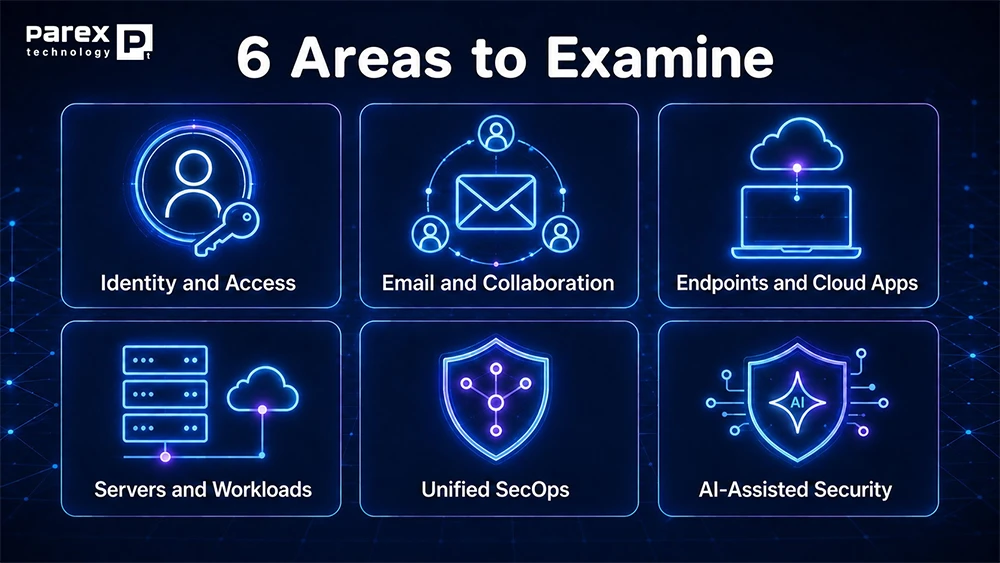
A strong assessment should follow the path an attacker might take across the environment. That requires evaluating six connected security areas.
1. Identity and Access
Identity is the connective tissue between Microsoft 365, Azure, SaaS applications, devices, and on-premises resources. The assessment should review authentication methods, multifactor authentication coverage, Conditional Access, privileged access, legacy authentication, risky users, and risky sign-ins.
The goal is to answer practical questions. Are high-risk sign-ins challenged or blocked? Can users safely remediate a compromised password? Are permanent administrative privileges more common than necessary? Do policies protect ordinary users and privileged accounts without creating avoidable disruption?
Microsoft Entra ID Protection can identify user and sign-in risk and support automated responses through risk-based Conditional Access policies. Those capabilities are most useful when their thresholds, exclusions, access controls, and remediation paths reflect the organization’s requirements.
2. Email and Collaboration
Email remains a frequent starting point for credential theft, impersonation, business email compromise, and malware delivery. The review should examine Exchange Online Protection, anti-phishing settings, impersonation protection, Safe Links, Safe Attachments, accepted domains, user reporting, alert policies, and attack-simulation practices.
It should also look beyond the inbox. Microsoft Teams, SharePoint, and OneDrive can carry malicious links or files and may become part of an attack that begins elsewhere. Microsoft Defender for Office 365 extends protection and investigation capabilities across email and collaboration workloads, with capabilities varying by plan.
The assessment should document technical controls and human-response processes. Employees need a clear way to report suspicious content, and the security team needs a defined path for investigating and responding to those reports.
3. Endpoints, Devices, and SaaS Visibility
Endpoints provide attackers with access to credentials, applications, files, and network resources. An assessment should evaluate device onboarding, sensor health, endpoint detection and response, antivirus configuration, operating-system exposure, application weaknesses, remediation ownership, and security baselines.
Microsoft Defender Vulnerability Management combines asset visibility, vulnerability assessment, threat intelligence, business context, and remediation guidance to help prioritize risk. The critical question is whether the resulting recommendations reach the teams that can act on them.
The assessment should also examine cloud application visibility. Microsoft Defender for Cloud Apps can help organizations discover SaaS usage, evaluate application risk, monitor unusual behavior, and strengthen control over cloud data. Reviewers should look for unapproved applications, excessive data movement, suspicious downloads, unusual sharing, and risky connected apps.
4. Servers and Workloads
Servers and cloud workloads require a different security lens than user devices. They may host critical applications, store sensitive information, or provide pathways to other resources. The assessment should review coverage, vulnerabilities, exposed management ports, attack paths, workload configurations, security recommendations, and ownership.
Microsoft Defender for Cloud provides cloud security posture management and workload protection capabilities across cloud and hybrid environments. The assessment should determine whether high-impact recommendations are prioritized according to asset criticality rather than treated as an undifferentiated backlog.
5. Security Operations and Incident Response
Security teams need enough context to distinguish a low-level alert from one stage of a larger attack. The assessment should review how signals flow into Microsoft Defender XDR, Microsoft Sentinel, or another SIEM; which data sources are missing; how incidents are assigned; and whether analysts can investigate across domains without repeatedly switching tools.
Microsoft is consolidating security operations experiences across SIEM, SOAR, XDR, exposure management, cloud security, threat intelligence, and AI-assisted workflows through the Microsoft Defender portal. An assessment should focus on the operating outcome: better correlation, clearer ownership, and faster movement from detection to containment.
6. AI-Assisted Investigation and Response
AI can help analysts summarize incidents, investigate suspicious activity, generate queries, and organize response steps. It does not remove the need for sound permissions, reliable data, experienced judgment, or human validation.
Microsoft Security Copilot integrates with Microsoft security products and supports incident response, threat hunting, intelligence gathering, and posture management. The assessment should examine where AI can reduce repetitive work, which data it can access, who can use it, and how generated recommendations will be reviewed before action.
Threats Hiding in Plain Sight
Common threat patterns that an organization may surface by reviewing connected security signals include:
- Leaked or compromised credentials
- Password spraying and repeated failed sign-ins
- Anonymous, unfamiliar, or otherwise risky sign-ins
- Phishing, impersonation, and malicious attachments
- Suspicious forwarding or mailbox-manipulation rules
- Unusual downloads, file sharing, deletion, or administrative activity
- Malware across email, devices, storage, and cloud applications
- Vulnerable endpoints, servers, and applications
The presence of an alert does not automatically prove a successful attack. It is a signal that needs context. A risky sign-in could be legitimate travel, a compromised account, or a policy gap. A large file download could be approved business activity or the beginning of data exfiltration.
That is why a useful Microsoft 365 security assessment connects the signal to the user, asset, business context, related activity, existing controls, and potential impact. The objective is not to make every alert sound critical. It is to identify which findings represent meaningful risk and what evidence supports that conclusion.
How the Assessment Works
The assessment should begin with business context rather than a predetermined product recommendation. First, the organization and its Microsoft partner align on objectives, critical systems, known concerns, regulatory requirements, stakeholders, and desired outcomes. Different organizations may prioritize different assets, users, workloads, and response requirements based on business impact and regulatory obligations.
Second, the team defines scope. That may include specific users, identities, devices, email domains, cloud applications, servers, Azure subscriptions, log sources, and Microsoft security services. Clear boundaries make findings easier to interpret and prevent the assessment from becoming an open-ended inventory exercise.
Third, the team validates readiness. This includes licensing, administrative permissions, security connectors, data availability, existing policies, change-control requirements, and the people needed to support the review. Temporary access or evaluation components should be documented and tightly controlled.
Fourth, security signals and configurations are examined for threats, vulnerabilities, misconfigurations, and coverage gaps. Findings should be supported by evidence and reviewed with people who understand the affected workloads.
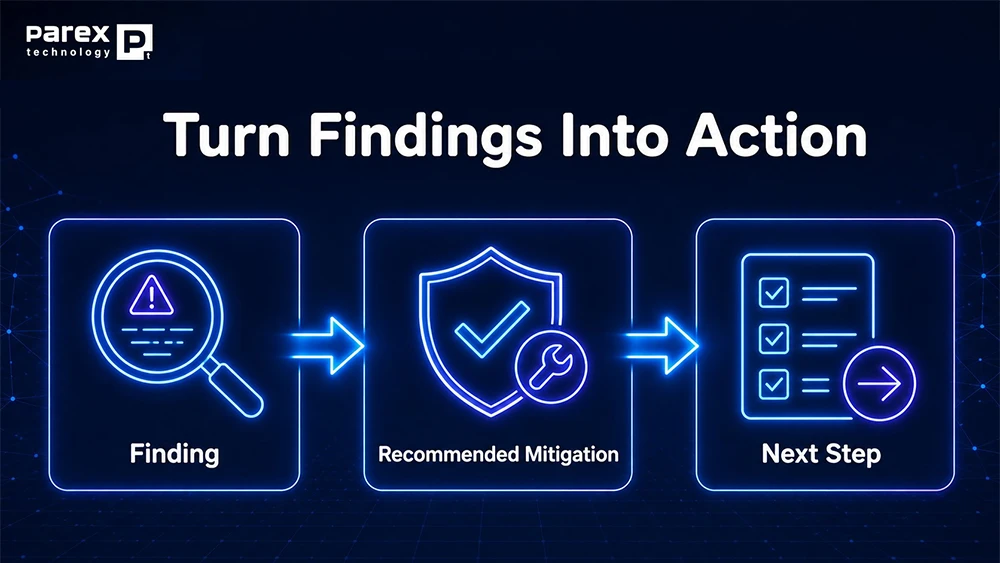
Fifth, each finding is mapped to a mitigation and next step. A particularly useful structure is:
- Finding
- Evidence observed
- Risk or potential impact
- Recommended mitigation
- Priority
- Owner
- Target timeframe
- Validation method
Finally, stakeholders review the results, agree on priorities, and remove temporary access or evaluation configurations. Responsible decommissioning should be part of the engagement, not an afterthought.
Turn Findings Into Action
A dashboard score can show that improvement is possible. It cannot decide which risk the organization should address first. Prioritization should consider likelihood of exploitation, potential business impact, the affected asset, breadth of exposure, existing compensating controls, remediation complexity, and accountable owner. This produces a more useful plan than sorting findings only by the severity label generated by a tool.
The roadmap should separate recommendations into three groups:
- Immediate actions: Investigate active threats and correct exposures that present urgent risk.
- Near-term improvements: Adjust configurations, close monitoring gaps, strengthen policies, and clarify operational ownership.
- Strategic initiatives: Modernize architecture, reduce technical debt, improve governance, consolidate workflows, and establish recurring reviews.
Every recommended action should include an owner, target timeframe, validation method, and explanation of the risk it addresses. That context helps IT and security leaders defend priorities, secure resources, and show progress to executive stakeholders.
When to Reassess Security
Security posture changes even when the organization has not experienced a known incident. New employees, devices, subscriptions, applications, integrations, policies, and workloads can introduce drift.
Organizations should consider a Microsoft 365 security assessment before a major licensing renewal; before deploying Microsoft 365 Copilot or other AI applications; after a migration, acquisition, or architecture change; following an incident or audit finding; when expanding Microsoft Defender; or when responsibility shifts between internal teams and providers. These reviews are especially important before AI deployments because identity controls, data governance, permissions, and sensitive information exposure can directly affect what users and AI-assisted experiences can access.
Regular reassessment can also verify that earlier remediation work remains effective. Security is not a one-time deployment milestone. It is an operating discipline that must evolve with the Microsoft environment and the business it supports.

Build Security Into Strategy
Microsoft environments influence more than software administration. They support daily operations, employee productivity, customer interactions, sensitive data, and business continuity. Security decisions therefore need to account for architecture, licensing, configuration, user experience, and operational ownership together.
Parex Technology approaches Microsoft consulting with a security-first mindset, combining architecture guidance, implementation experience, licensing insight, and ongoing engineering support. That broader perspective helps organizations move from isolated findings to a Microsoft environment that is easier to understand, govern, and improve over time.
The right assessment should leave leaders with clearer answers: Which threats and vulnerabilities matter most? Which controls are working? Where are the gaps? What should happen next, and who owns it?
Assess Your Microsoft Security Posture
Review threats, vulnerabilities, and configuration risks across Microsoft 365, Azure, identity, endpoints, and cloud applications. Talk with Parex about a Microsoft security assessment and a prioritized remediation plan.
Frequently Asked Questions
What Is a Security Assessment?
A Microsoft 365 security assessment is a structured review of threats, vulnerabilities, configurations, integrations, and response processes across an organization’s Microsoft environment. It combines technical evidence with business context to identify meaningful risks and produce a prioritized remediation plan.
Can It Find Active Threats?
An assessment can surface signals associated with active or recent threats, including risky sign-ins, phishing, malware, suspicious mailbox activity, unusual file behavior, and vulnerable assets. Each finding still requires investigation and context before the organization concludes that an attack occurred.
Is It a Penetration Test?
No. A security assessment reviews security signals, vulnerabilities, configurations, coverage, and operational readiness. A penetration test actively attempts to exploit weaknesses under an authorized scope. Organizations may need both services, but they answer different questions and require different methods.
Do You Need Microsoft 365 E5?
Not necessarily. Available assessment capabilities depend on the organization’s current licenses, products, and configuration. Parex can identify what can be evaluated with the existing environment and where trials, additional licensing, or a different assessment method may be appropriate.
How Long Does It Take?
The timeline depends on scope, environment complexity, stakeholder availability, data-collection requirements, and the number of security areas included. Before the engagement begins, Parex works with the customer to define the expected schedule, responsibilities, access requirements, and deliverables.
How Often Should You Reassess?
Many organizations benefit from an annual review plus targeted assessments after major technology or business changes. Higher-risk or rapidly changing environments may need more frequent reviews. The appropriate cadence should reflect regulatory obligations, environment complexity, threat exposure, and internal security capacity.